EAPH.com Logo
EAPH.com: Hosting and Help for eBay SellersTM
Home Member Login
FreeForm robshelp.com
FreeForm2 freeform2.robshelp.com
Support: rob@robshelp.com
Enter your EAPH member name here: Then click Go
ALERT! ... EAPH.com hosting is phasing out ... ALERT!

EAPH Hosting has been in place since 2002 and was quite helpful to many eBay sellers for many years especially when used in combination with FreeForm and FreeForm2 at robshelp.com. BUT, the one constant in life is "everything changes eventually" and the service has become virtually obsolete. Those of you who are members should begin to explore hosting alternatives. Those of you remembering the good old days and wanting to return to this hosting service should look elsewhere. New memberships signups will soon become unavailable.

~Rob Bell (March 2026) (I wish it could have gone on even longer than it has)
Returning Members
Your EAPH member name is the name you specified during sign up. If you have forgotten your member name or password write to the support email address rob@robshelp.com and a reminder will be sent.

Every EAPH member is assigned their own unique login location during setup. That login location will be contained in a Welcome email sent when the setup process is completed. If you have any difficulty using the member login above, you may instead go to the login location in your Welcome email.
New Members
The new member setup process is not automated. Time will elapse between signing up and receiving your Welcome email which signals your hosting is ready to use. After having signed up if you do not receive the Welcome email within a few hours, write to the support email address rob@robshelp.com.

The Welcome email is sent to the "primary" email address assigned in your PayPal account. If you are unable to receive email at that address, write to rob@robshelp.com explaining the situation.

Confirm you are logging in at the correct location
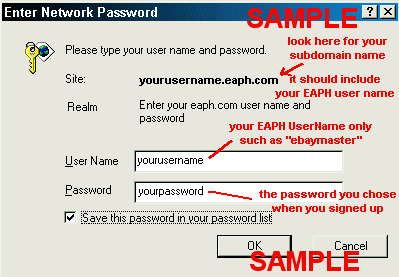
When you go to the login location assigned in your Welcome email a login screen will pop up looking something like this:

sample login box
Internet Explorer 9 has a peculiarity requiring the member name and password be typed in instead of copy and paste.
You must type in your member name and password when using Internet Explorer 9.

You can be sure you are at the right place by finding your EAPH member name somewhere preprinted in the popup window.